
WTF is WTF Mode? And Other iPod Recovery Stages
WTF Mode is a second-stage bootloader, that receives its boot image over USB. This mode is made completely transparent by iTunes.
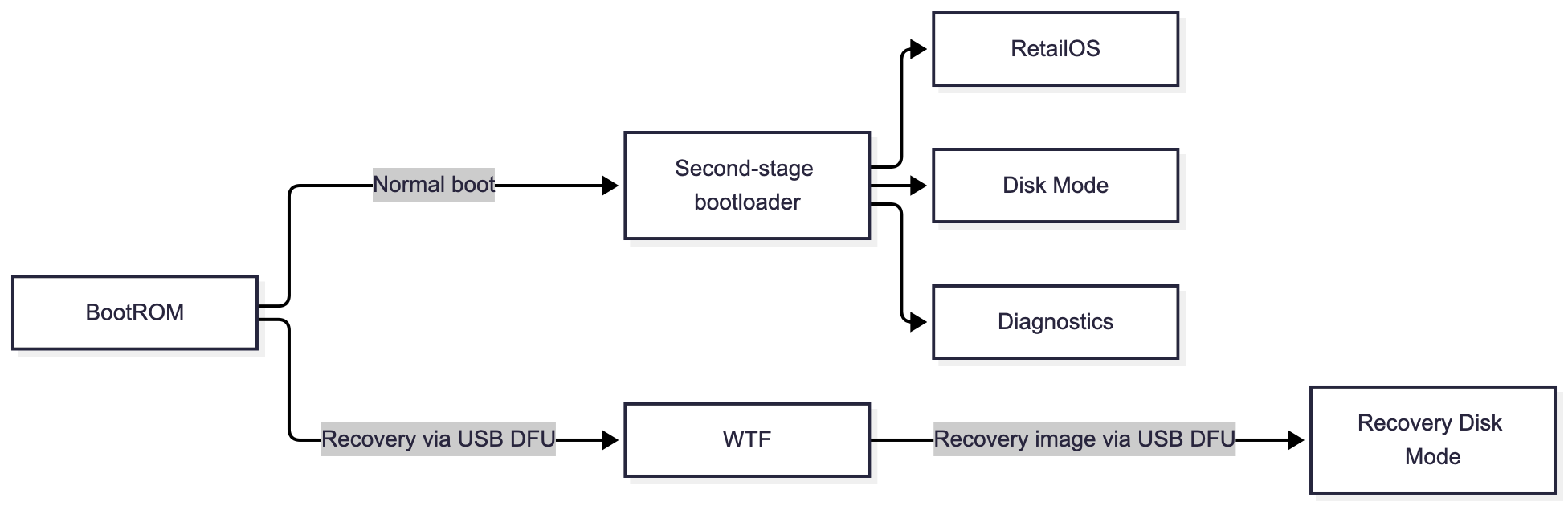
tl;dr it's a second-stage bootloader, but receives its boot image over USB instead of one that's stored on the device.
If you've ever tinkered with an iPod or an iPhone, you're likely familiar with DFU Mode, or Device Firmware Upgrade. It's entered into by pressing a specific button sequence.
The BootROM
When an iPod boots, the BootROM performs just enough initialization to verify the next stage of the boot process. It also has to initialize some drivers to accept certain user inputs, like button state. The BootROM is responsible for verifying and loading a second bootloader or booting into DFU Mode.
The second-stage bootloader shown in the diagram below is the default path. It selects whether to boot into the main retailOS, disk mode, or diagnostics mode (this is not DFU mode).
When in DFU mode, an iPod expects to receive firmware over USB. Specifically, it expects to receive a specially formatted IMG1 (the iPod individual image formats used in iPod firmware) to boot into what's called WTF Mode.
WTF Mode
There's no recorded meaning behind what WTF stands for, though some postulate it's Where's The Firmware (I'm sure it has two meanings 😄). You can observe it in Apple's file naming convention, such as WTF.x1225.release.dfu.
WTF Mode's whole purpose is to allow the iPod to receive any such IMG1 over USB and boot it. That is, assuming it's cryptographically signed, verified, and decrypted by DFU Mode.
A typical IMG1 – and what iTunes passes to WTF Mode – would be one that puts the iPod into Recovery Disk Mode, but it's also possible to boot the normal retailOS.
WTF Mode is hidden from the user. On macOS, Finder, via AMPDevicesAgent/AMPDeviceDiscoveryAgent, (on Windows, I guess people still use iTunes?) enters this mode automatically and transiently for you when you restore from DFU Mode.
Annoyingly, my iPod classic 7G did appear to enter WTF Mode without any user interaction; just connecting to an iPod in DFU Mode to my Mac triggered WTF Mode. I got around this by pausing AMPDevicesAgent and AMPDeviceDiscoveryAgent:
killall -STOP AMPDevicesAgent AMPDeviceDiscoveryAgentEntering WTF Mode from DFU Mode manually (without a macOS process interrupting) seems a bit tricky. I haven't given it a whirl yet, but rockbox, an open-source music player that can run on iPods, does appear to have a way to do so.
Finally, you can detect which mode your iPod is in with system_profiler SPUSBHostDataType. You should see output (redacted) similar to the following. Consult freemyipod's table to decode the Product ID.
        USB DFU Device:

          Location ID: 0x20300000
          Connection Type: Removable
          Manufacturer: Apple Computer, Inc.
          Serial Number: 87020000000001
          Link Speed: 480 Mb/s
          USB Vendor ID: 0x05ac
          USB Product ID: 0x1223
          USB Product Version: 0x0001
Sources
mks5lboot: Info on what's parsed in DFU mode.- The Apple Wiki's DFU article
- The Apple Wiki's WTF Mode page
- freemyipod's article, Modes: Provides a great overview of the different modes an iPod can be in.
- q3k's blog post on wInd3x: The most in-depth & technical reference regarding the boot chain.
Use of AI
All content written here was done by my hand. An agent was referenced as an aide to my technical understanding and to create the Mermaid chart.